



Introduction
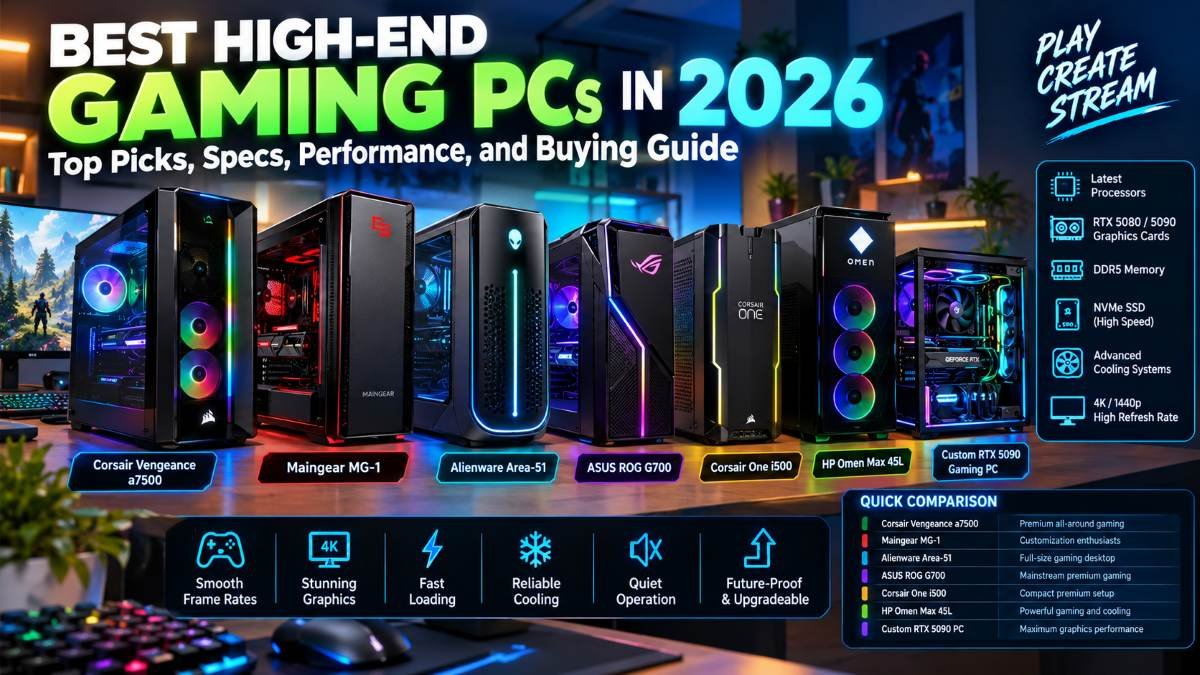
Choosing one of the best high-end gaming PCs in 2026 is typically more than a matter of selecting the most expensive desktop computer. Many gamers want smooth frame rates detailed graphics fast loading reliable cooling quiet operation and enough power to run the game for years to come. Streamers and content creators want a system that can handle recording, video editing, multitasking and other demanding workloads.
Today’s premium gaming desktops provide powerful graphics cards, advanced processors, fast DDR5 memory, high-speed NVMe SSDs, sophisticated cooling systems and modern connectivity. Depending on the configuration, they can provide an excellent experience at 1440p or 4K resolution, especially when paired with a suitable high-refresh-rate monitor.
However, not every expensive gaming PC provides the same value. Some systems prioritize raw graphics performance while others provide better cooling, quieter operation, ease of upgrades, or stronger customer support.
This guide explores the best high-end gaming PCs to consider in 2026, explains which configurations make sense for different buyers and shows you how to choose a desktop that fits your budget and gaming needs.
Quick answer: For a premium all-around gaming experience, consider the Corsair Vengeance a7500. For extensive customization and enthusiast performance, look at the Maingear MG-1. For a large desktop with strong cooling and upgrade potential, consider the Alienware Area-51. For your priority maximum 4K graphics performance, look for a properly configured system with an NVIDIA GeForce RTX 5090 or RTX 5080.
Product configurations, prices and availability can change so always verify the exact specifications before purchasing.
Table of Contents
Quick Comparison: Best High-End Gaming PCs in 2026
| Gaming PC | Best For | Key Consideration |
| Corsair Vengeance a7500 | Premium all-around gaming | Build quality and balanced performance |
| Maingear MG-1 | Customization enthusiasts | Flexible configurations and premium assembly |
| Alienware Area-51 | Full-size gaming desktop | Cooling, noise and upgrade options |
| ASUS ROG G700 | Mainstream premium gaming | Configuration and value |
| Corsair One i500 | Compact premium setup | Space-saving design and pricing |
| HP Omen Max 45L | Powerful gaming and cooling | Compare exact configuration and warranty |
| Custom RTX 5090 Gaming PC | Maximum graphics performance | High cost, power requirements and heat |
These are recommended options you should investigate but not a universal performance ranking. The best choice depends on the exact hardware configuration and your priorities.
1. Corsair Vengeance a7500 — Best Overall Premium Gaming PC
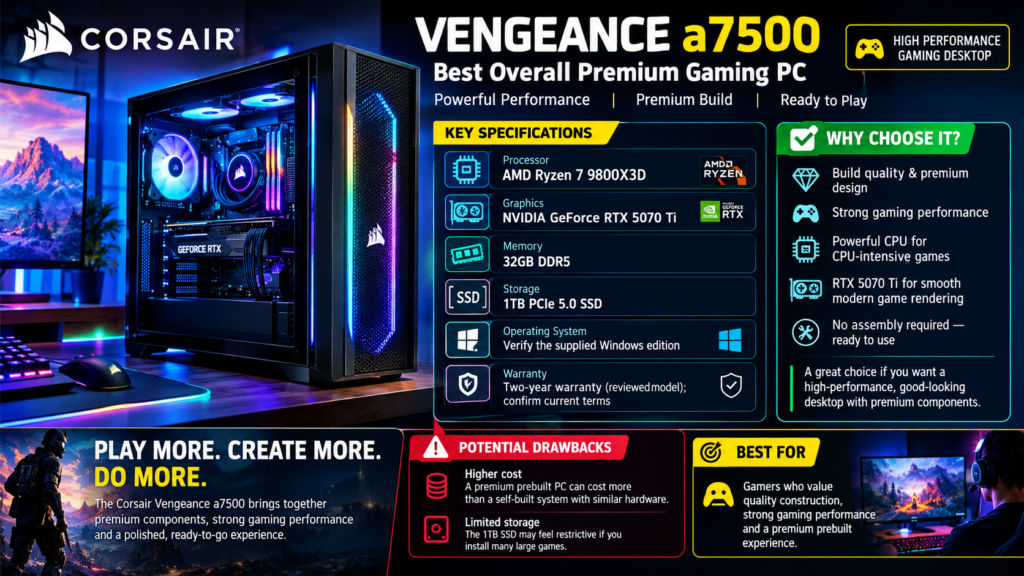
The Corsair Vengeance a7500 is an attractive option for buyers who want a high-performance gaming desktop with premium components and careful assembly.
A reviewed configuration includes an AMD Ryzen 7 9800X3D processor an NVIDIA GeForce RTX 5070 Ti graphics card, 32GB of DDR5 memory and a 1TB PCIe 5.0 SSD. Its combination of gaming-focused processing power and modern graphics makes it suitable for demanding games and multitasking.
Key Specifications
Processor: AMD Ryzen 7 9800X3D
Graphics: NVIDIA GeForce RTX 5070 Ti in the reviewed configuration
Memory: 32GB DDR5
Storage: 1TB PCIe 5.0 SSD
Operating system: Verify the supplied Windows edition
Warranty: A two-year warranty was listed for the reviewed model; confirm current terms
Why Choose It?
The Vengeance a7500 is focused on build quality, gaming performance and a premium overall experience. Its powerful CPU can be particularly useful in CPU-intensive games while the graphics card provides the rendering performance needed for demanding modern titles.
The system is also worth considering if you want a desktop that looks polished without having to assemble every component yourself.
Potential Drawbacks
A premium prebuilt PC can cost more than a self-built system using similar hardware. The reviewed configuration also has a 1TB SSD, which may feel restrictive if you install many large games.
Best for: Gamers who value quality construction strong gaming performance and a premium prebuilt experience.
2. Maingear MG-1 — Best for Customization
The Maingear MG-1 is worth considering if you want more control over the components inside your gaming desktop.
Unlike a fixed configuration a customizable system lets you choose hardware that suits your needs. You may be able to choose a more powerful GPU, additional memory, a larger SSD, a different processor or other upgrades depending on the available configuration.
A reviewed high-end configuration featured an AMD Ryzen 9 9950X3D2 processor, an NVIDIA GeForce RTX 5090, 32GB of DDR5 memory and a 2TB PCIe 5.0 SSD. That configuration illustrates the system’s potential, but it is not necessarily the standard configuration or the best value for every buyer.
Key Features
- Flexible component configurations
- High-end CPU and GPU options
- Premium assembly and cable management
- Fast NVMe storage
- Potential for demanding gaming and creative workloads
Why Choose It?
The MG-1 appeals to enthusiasts who care about more than benchmark numbers. Component selection, cable management, appearance and the ability to tailor a system to specific workloads can make a difference in everyday use.
An RTX 5090 configuration can be particularly attractive for 4K gaming with demanding ray-tracing settings. It may also suit creators who use GPU-accelerated rendering or other compatible applications.
Potential Drawbacks
High-end configurations can become extremely expensive. Before ordering, check the included graphics card, power supply, motherboard, cooling system, front-panel connections and upgrade options.
Do not assume every MG-1 configuration includes flagship hardware.
Best for: Enthusiasts who want a personalized gaming desktop and are willing to pay for a carefully configured system.
3. Alienware Area-51 — Best Full-Size Gaming Desktop
Alienware’s Area-51 is designed for buyers who want a substantial gaming desktop with powerful hardware and a distinctive design.
Depending on the configuration, it has been offered with high-end Intel or AMD processors, powerful GeForce graphics, DDR5 memory and NVMe storage.
A reviewed configuration included an Intel Core Ultra 9 285K or AMD Ryzen 9 9950X3D processor an NVIDIA GeForce RTX 4090, 64GB of DDR5 memory and a 2TB NVMe SSD. Because configurations vary verify the GPU and other components on the exact model being sold.
Key Features
- Large desktop chassis
- Powerful processor options
- High-performance graphics configurations
- Substantial memory and storage options
- Cooling designed for demanding workloads
- Multiple connectivity options depending on configuration
Why Choose It?
A full-size gaming desktop can provide more room for cooling larger components and future upgrades than a compact machine. The Area-51 is worth investigating if you prefer a large tower and want a system that can handle extended gaming sessions.
It can also be suitable for streaming, video editing and productivity when configured with sufficient memory and storage.
Potential Drawbacks
The chassis is large, so measure your available desk or floor space before buying. Some upgrades may require special adapters or additional parts, depending on the model.
Also, do not buy solely because a desktop has an Alienware name. Compare its actual GPU, CPU, cooling, warranty and total price against competing systems.
Best for: Buyers who want a powerful full-size desktop with a premium design and room to grow.
4. ASUS ROG G700 — Best for Mainstream Premium Gaming
The ASUS ROG G700 is another gaming desktop worth comparing if you want a recognizable gaming brand and a system that is ready to use out of the box.
Its specifications depend on the selected configuration, so shoppers should verify the exact processor, GPU, memory and storage before deciding.
Some reviewed configurations have offered 32GB of RAM, a 1TB or 2TB SSD and a 240mm liquid cooler.
What to Look For
- A gaming-focused processor
- A GPU suitable for your target resolution
- At least 32GB of RAM for a premium gaming build
- Adequate SSD capacity
- Effective cooling and airflow
- Standard or clearly documented upgrade options
Why Choose It?
A prebuilt desktop is convenient because the manufacturer assembles the hardware, installs the operating system and provides a support process for the complete system.
The G700 may be a sensible choice if you want a gaming desktop without spending time researching every component or building the computer yourself.
Potential Drawbacks
Brand reputation does not guarantee the best value. Two desktops with the same model’s name may have different hardware and a cheaper configuration may include a weaker graphics card or less storage.
Compare the exact specification sheet before purchasing.
Best for: Gamers who prefer an established gaming-PC brand and want a ready-to-use desktop.
5. Corsair One i500 — Best Compact Premium Gaming PC
Not every enthusiast has space for a large tower. The Corsair One i500 is worth considering if you want a more compact premium gaming desktop.
Its compact design can fit better into a carefully planned gaming room, office or workstation setup than a very large full-size tower.
Depending on the configuration, the i500 has been available with powerful processors, dedicated graphics, DDR5 memory and fast SSD storage.
Key Advantages
- Compact footprint compared with many full-size towers
- Premium exterior design
- Powerful hardware options
- Suitable for gaming and creative work
- Attractive for minimalist desk setups
What Should You Check?
Compact systems require careful thermal design. Confirm the cooling arrangement, fan noise, GPU configuration, available ports and the procedure for replacing or upgrading components.
Also check the price carefully. A compact premium system may cost more than a larger desktop with similar performance.
Best for: Buyers who want powerful gaming hardware without the footprint of a traditional large tower.
6. HP Omen Max 45L — Best for Cooling-Focused Gaming
The HP Omen Max 45L is another option to compare when evaluating high-performance gaming desktops.
Cooling matters because powerful CPUs and GPUs can generate substantial heat during demanding workloads. A well-designed chassis and cooling system help components maintain their intended operating behavior without excessive fan noise.
Important Features to Evaluate
- CPU and GPU configuration
- Case airflow
- CPU cooler size and design
- GPU temperature under sustained gaming
- Fan noise under load
- Power-supply quality and capacity
- Warranty and repair support
Why Cooling Matters
A PC may deliver excellent performance in a short benchmark but behave differently during several hours of gaming or rendering.
A good cooling system should move heat away from the CPU and GPU efficiently while providing enough fresh air to the rest of the components.
Liquid cooling is not automatically better than every air cooler. The quality of the design, radiator size, airflow, installation and fan curves all matter.
Best for: Gamers who prioritize sustained performance and want to compare cooling-focused desktop designs.
Before buying, confirm the exact configuration and independent test results rather than relying on the model’s name alone.
7. Custom RTX 5090 Gaming PC — Best for Maximum Graphics Performance
If your goal is to build one of the most powerful gaming systems available, a custom desktop with the NVIDIA GeForce RTX 5090 deserves consideration.
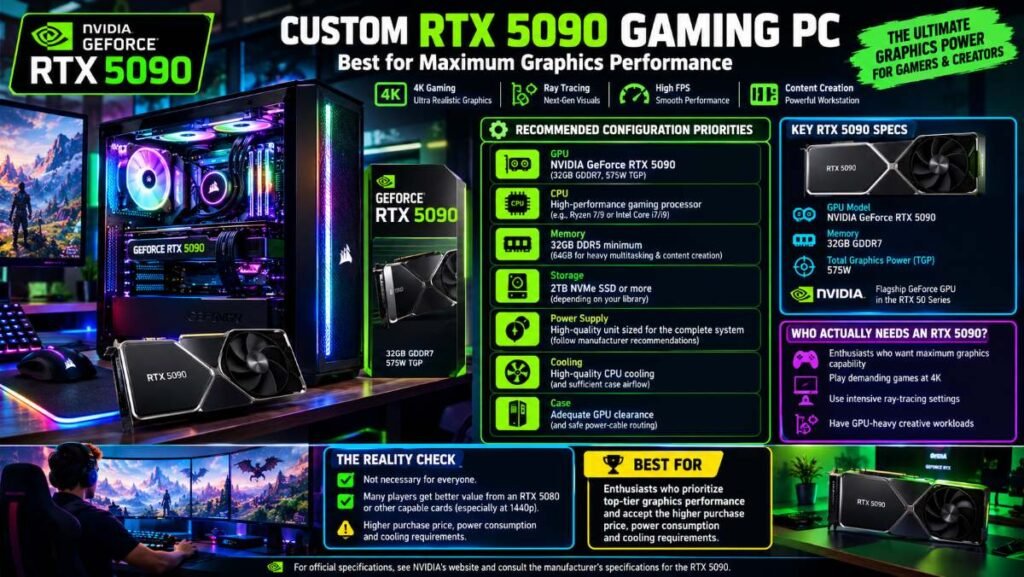
The RTX 5090 is NVIDIA’s flagship GeForce graphics card in the RTX 50 series. NVIDIA lists 32GB of GDDR7 memory and a 575W total graphics power rating for the reference specification.
The card’s power requirements make system design especially important. Buyers must consider the power supply, case clearance, cooling, cable routing and the manufacturer’s recommendations.
Recommended Configuration Priorities
- GPU: NVIDIA GeForce RTX 5090
- CPU: A high-performance gaming processor appropriate for the intended games
- Memory: 32GB DDR5 minimum for a premium gaming configuration, consider 64GB for heavier multitasking and content creation
- Storage: 2TB NVMe SSD or more, depending on your library
- Power supply: High-quality unit sized for the complete system and compliant with component recommendations
- Cooling: High-quality CPU cooling and sufficient case airflow
- Case: Adequate GPU clearance and safe power-cable routing
Who Actually Needs an RTX 5090?
An RTX 5090 is most attractive to enthusiasts who want maximum graphics capability, play demanding games at 4K, use intensive ray-tracing settings or have GPU-heavy creative workloads.
However, a flagship GPU is not necessary for everyone. Many players will get better overall value from an RTX 5080 or another capable graphics card, particularly if they use a 1440p monitor or play competitive games that emphasize high frame rates.
Best for: Enthusiasts who prioritize top-tier graphics performance and accept the higher purchase price, power consumption and cooling requirements.
For official specifications, see NVIDIA’s and consult the manufacturer’s specifications for the RTX 5090.
How to Choose the Best High-End Gaming PC in 2026
The best gaming PC is the one that delivers the right performance for your games, monitor, budget and future plans.
1. Choose Your Gaming Resolution
Your monitor should influence your hardware budget.
1080p gaming: A premium GPU may be unnecessary for many games. A fast CPU can be particularly important when targeting very high frame rates in competitive titles.
1440p gaming: This is an excellent target for many high-end gaming PCs. A capable modern GPU, a good gaming processor and 32GB of RAM make a strong starting point.
4K gaming: Demanding 4K games benefit from a powerful GPU. Consider the RTX 5080, RTX 5090 or competing cards based on independent benchmarks, price and the features you need.
Remember that performance varies by game, graphics settings, CPU, driver and whether upscaling or frame generation is enabled.
2. Select the Right Processor
A high-end gaming PC needs a processor that complements its graphics card.
AMD’s Ryzen X3D processors are particularly interesting for gaming because their additional cache can improve performance in compatible games. Intel Core Ultra processors may also be suitable, especially when gaming is combined with productivity workloads.
Do not choose a processor based only on its core count or advertised clock speed. Look for independent gaming benchmarks that match your resolution and intended games.
3. Get Enough RAM
For a premium gaming PC in 2026, 32GB of DDR5 memory is a sensible starting point.
It provides room for modern games, a browser, voice chat and other background applications. Consider 64GB if you regularly edit high-resolution video, work with large creative projects, run virtual machines or perform memory-intensive tasks.
More RAM does not automatically produce higher gaming frame rates once a game has enough memory available.
4. Buy Enough SSD Storage
Modern games can consume substantial storage space, especially when you install several large titles.
A 1TB SSD is usable, but 2TB is a more comfortable starting point for many premium gaming systems. A 4TB drive may make sense for a large game library or creative workload.
NVMe SSDs provide fast access and loading performance, but the difference between SSD models is not equally noticeable in every game.
Check whether the desktop has an additional M.2 slot or another convenient storage upgrade option.
5. Check the Power Supply
Power delivery is especially important when using flagship graphics cards.
Look beyond the wattage printed on the power supply. Check the manufacturer’s exact model, efficiency rating, connector support, warranty and recommended system power.
For example, NVIDIA lists an 850W required system power recommendation for the RTX 5080 reference configuration, while the RTX 5090 has substantially higher graphics power demands. The appropriate power supply depends on the complete system and the specific card.
Never assume that every desktop with the same GPU requires the identical power supply.
6. Evaluate Cooling and Noise
Look for good airflow, suitable CPU cooling and enough space around the graphics card.
Reviews that measure temperatures and noise under sustained workloads are more useful than marketing claims about cooling technology. If you work or stream in the same room, quieter fans can improve your experience considerably.
7. Check Upgradeability
Before buying, investigate whether the motherboard, power supply, case and cooling system use standard components.
Check how many RAM slots and M.2 slots are available, whether the GPU can be replaced and whether the manufacturer uses proprietary power connectors or motherboard layouts.
A desktop that is easier to repair and upgrade may offer better long-term value even if its initial price is slightly higher.
What is a Reasonable Budget for a High-End Gaming PC?
The following are broad guidelines for US buyers. The figures below are not live prices or guarantee in stock.
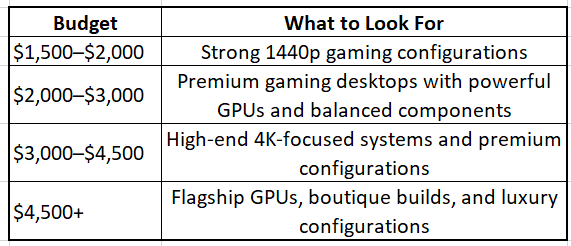
Actual prices will vary according to components, configuration, promotions, warranty coverage and the seller. Premium systems can stretch much higher than the listed budget.
Should you buy a $5000 gaming PC?
Only if the extra performance or features justify the expense. A $5000 desktop may be right for you if you need flagship graphics, lots of storage, a premium custom build or a desktop that can also tackle more intensive workloads professionally.
If you mainly play esports titles at 1440p, you may get better value out of a cheaper system. Remember to budget the cost of the monitor as well as the keyboard, mouse, headset and any other peripherals. Your powerful desktop won’t show its graphical potential to the fullest if you use a cheap monitor not suited to your needs.
Prebuilt Gaming PC vs. Custom-Built PC
Both options have their appeal.
Buy a Prebuilt Gaming PC if:
• You need a working computer
• You want your support to come from one main vendor and don’t mind their single brand
• You don’t want the hassle of building and testing each component
• You found a decent configuration with a reasonable warranty
Build a Custom Gaming PC if:
• You want to choose every component
• You want total control over the case, motherboard, cooling solutions and power supply
• You are happy to build and troubleshoot your PC
• You want to avoid unneeded features
Either option doesn’t always cost less. Look at the prices of equivalent components, the Windows license and assembly as well as shipping and support before making a choice.
Common Mistakes to Avoid When Buying a High-End Gaming PC
Buying the most expensive GPU without checking your monitor: that flagship graphics card may be way beyond your needs
Not paying attention to the power supply: a mismatched or low-quality PSU can cause issues
Prioritizing looks over airflow: RGB lights and tempered glass may look nice but don’t cool your PC
Assuming every prebuilt is easy to upgrade: proprietary parts and tight clearances can add complications
Not reading the fine print for the warranty: you may need to send the whole desktop for repairs instead of a single component
Being misled by FPS: ask for the game, resolution, settings, CPU, driver version and if upscaling/frame-generation was used
Overlooking the full cost: don’t forget taxes, shipping, the monitor, accessories and if any upgrades are needed
Frequently Asked Questions
What is the best high-end gaming PC in 2026?
It depends on your needs. The Corsair Vengeance a7500 is a great option for a premium all-rounder while the Main gear MG-1 is very attractive for a customizable build. If you want the absolute graphics performance look at a system with an RTX 5090
Is an RTX 5090 worth it for gaming?
It can well be for enthusiasts who want the very latest flagship graphics card or are looking for demanding 4K gaming and/or 4K GPU-intensive creative work. It’s not worth it for a player who mainly plays esport games or uses a 1440p monitor.
Is 32GB of RAM enough for high-end gaming?
Yes, it should be for most gamers. Get 64GB if your creative applications or other workloads need it.
Is a 2TB SSD enough for a gaming PC?
Yes, for most gamers. It will give you enough space for Windows, applications and a library of games. Get 4TB or more if you have more games or need more media space.
Is liquid cooling better than air?
Not necessarily. A good air cooler can do a fabulous job. Liquid can offer advantages sometimes but the radiator size, airflow and installation matter as well.
How long should a high-end gaming PC last?
A well-kept desktop can serve you for a long time. But how long will it run every new game at maximum settings? That depends on your expectations since the requirements change over time. You can usually keep using a desktop for many years if you upgrade the GPU or storage.
Can a high-end gaming PC be used for streaming and video editing?
Yes, a well-equipped gaming PC can also be used to stream, edit and render videos. Choose an amount of memory, storage, CPU performance and a GPU with features supported by your software.
Is it better to buy a gaming PC online or in a store?
Both options have their appeal. An online store will have a wider variety while a local shop may help with returns and physical support. Make sure to check the reputation of a seller, the exact specification sheet, return policy, shipping charges and warranty before buying.
What should I check when my new gaming PC arrives?
Look at the box for any damages, check the specs are correct, install the latest drivers, check the temperatures and that the fans are working well. Keep your receipt and warranty records safe as well
