



When people build or upgrade a computer, they often focus on the processor, graphics card, RAM and storage. However, one of the most important components for system performance and longevity is the CPU cooler.
A CPU cooler is responsible for keeping your processor at safe temperatures. Without proper cooling, your CPU can overheat, causing slow performance, random shutdowns, crashes and even permanent damage.
Table of Contents
What Is a CPU Cooler?
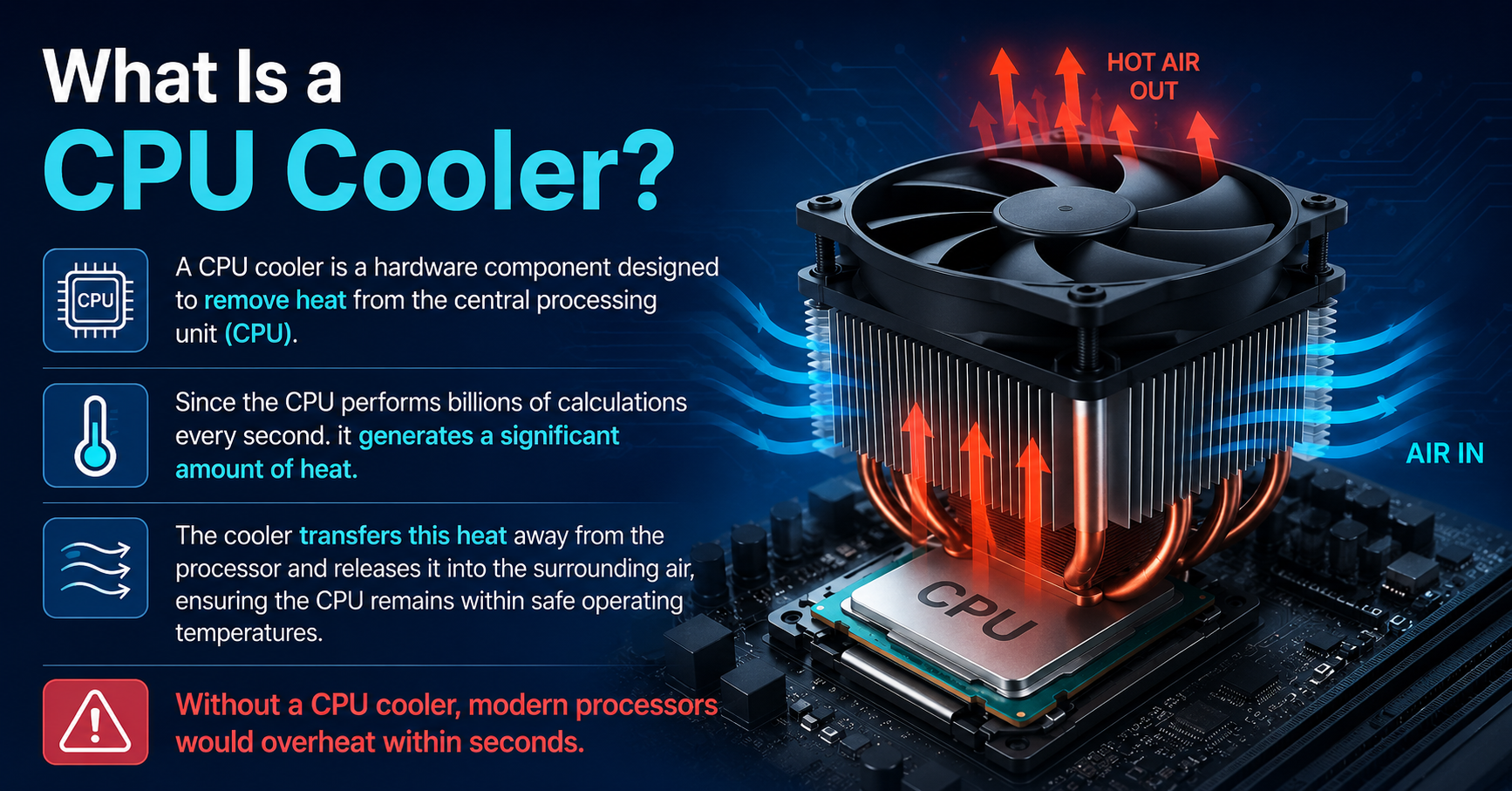
A CPU cooler is a hardware component designed to remove heat from the central processing unit (CPU). Since the CPU performs billions of calculations every second. it generates a significant amount of heat.
The cooler transfers this heat away from the processor and releases it into the surrounding air, ensuring the CPU remains within safe operating temperatures.
Without a CPU cooler, modern processors would overheat within seconds.
Central Processing Unit (CPU)
The CPU is often called the “brain” of the computer. It handles tasks such as:
- Running operating systems
- Processing applications
- Managing calculations
- Handling game logic
- Performing video editing and rendering
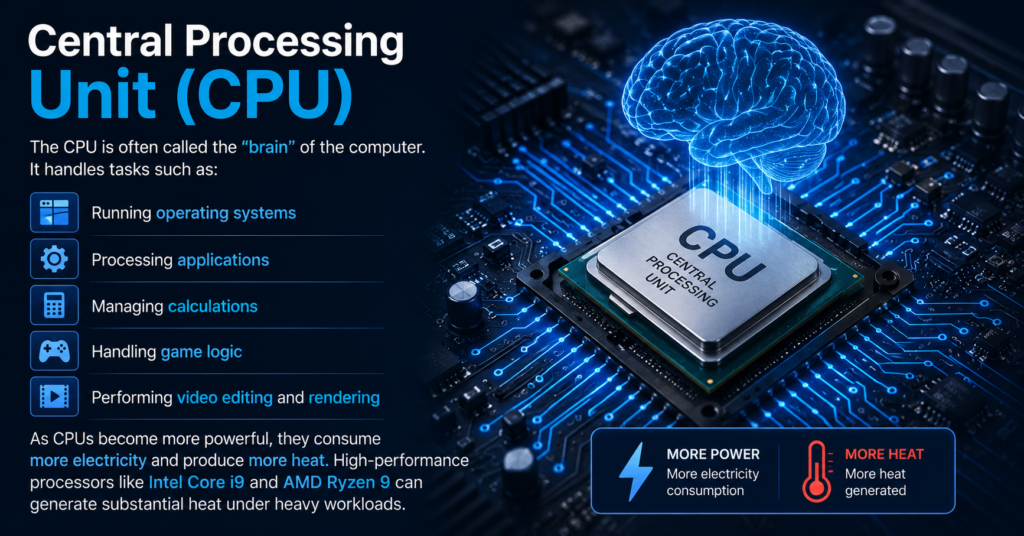
As CPUs become more powerful, they consume more electricity and produce more heat. High-performance processors like Intel Core i9 and AMD Ryzen 9 can generate substantial heat under heavy workloads.
Why Is CPU Cooling Important?
Proper CPU cooling is essential for several reasons.
1. Prevents Overheating
Excessive heat can cause the processor to become unstable or shut down to protect itself.
2. Maintains Performance
Modern CPUs automatically reduce speed when temperatures get too high, a process known as thermal throttling.
3. Extends Hardware Lifespan
Lower temperatures reduce wear on the processor and surrounding motherboard components.
4. Improves System Stability
A cooler-running CPU leads to fewer crashes and more reliable performance.
5. Supports Overclocking
If you increase CPU clock speeds, you will need better cooling to handle the additional heat.
How Does a CPU Cooler Work?
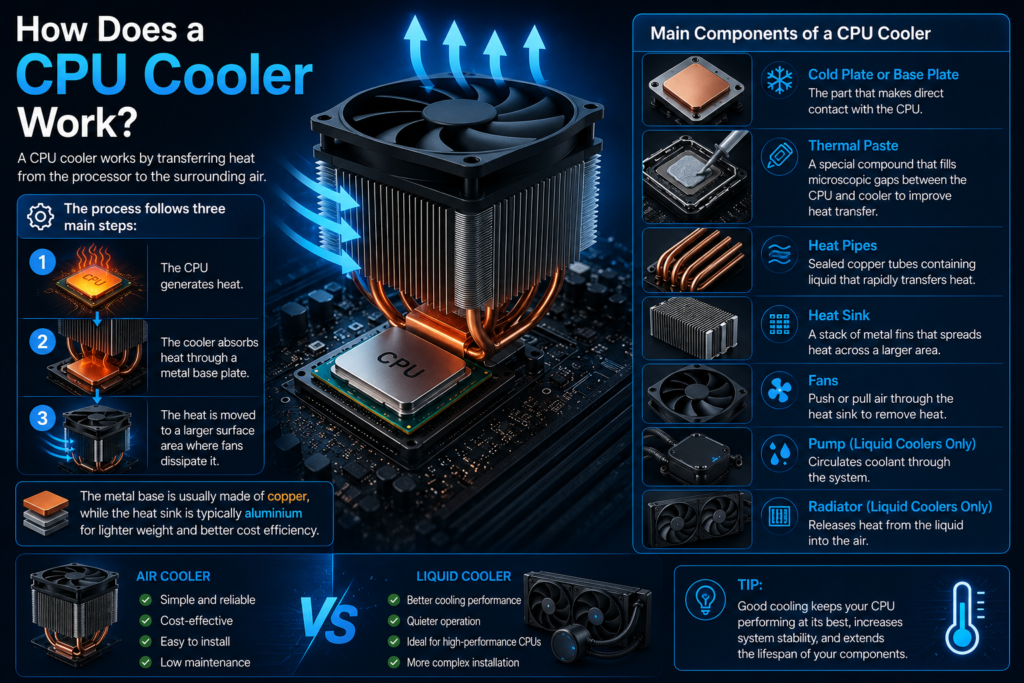
A CPU cooler works by transferring heat from the processor to the surrounding air.
- The process follows three main steps:
- The CPU generates heat.
- The cooler absorbs heat through a metal base plate.
- The heat is moved to a larger surface area where fans dissipate it.
The metal base is usually made of copper, while the heat sink is typically aluminium for lighter weight and better cost efficiency.
Main Components of a CPU Cooler
Cold Plate or Base Plate
The part that makes direct contact with the CPU.
Thermal Paste
A special compound that fills microscopic gaps between the CPU and cooler to improve heat transfer.
Heat Pipes
Sealed copper tubes containing liquid that rapidly transfers heat.
Heat Sink
A stack of metal fins that spreads heat across a larger area.
Fans
Push or pull air through the heat sink to remove heat.
Pump (Liquid Coolers Only)
Circulates coolant through the system.
Radiator (Liquid Coolers Only)
Releases heat from the liquid into the air.
Types of CPU Coolers
There are two primary categories of CPU coolers:
- Air Coolers
- Liquid AIO Coolers
Both are highly effective but each has different strengths and weaknesses.
1. What Is an Air CPU Cooler?
An air cooler uses a metal heat sink and one or more fans to cool the processor.
2. How Air Coolers Work
Heat transfers from the CPU to the copper base.
- Heat pipes move the heat to aluminium fins.
- Fans blow cool air through the fins.
- Warm air exits the case.
Air coolers are the most common and reliable CPU cooling solution.
Popular Air Coolers models
- Noctua NH-D15
- Cooler Master Hyper 212
- Deep Cool AK620
- be quiet! Dark Rock Pro 5
Advantages of Air Coolers
Affordable
Excellent models are available at reasonable prices.
Highly Reliable
No pump and no liquid mean fewer points of failure.
Easy Maintenance
Usually only requires occasional dust cleaning.
Long Lifespan
Quality air coolers can last for many years.
Excellent Performance
Premium models rival many liquid coolers.
Disadvantages of Air Coolers
Large Size
Big tower coolers can interfere with RAM or side panels.
Heavier Weight
Dual-tower models are physically substantial.
Traditional Appearance
Some users prefer the cleaner look of liquid cooling.
What Is a Liquid AIO Cooler?
A liquid AIO (All-In-One) cooler uses coolant, tubing, a pump and a radiator to cool the CPU.
The term “all-in-one” means the system is factory sealed and pre-filled, requiring no custom setup.
How Liquid AIO Coolers Work
- The cold plate absorbs heat from the CPU.
- The pump circulates coolant.
- Warm liquid moves to the radiator.
- Fans cool the radiator.
- Cooled liquid returns to the CPU block.
Popular Liquid AIO Coolers
- Corsair iCUE H150i Elite Capellix XT
- NZXT Kraken Elite 360
- Arctic Liquid Freezer III 360
- Deep Cool LT720
Advantages of Liquid AIO Coolers
Superior Cooling for High-End CPUs
Large radiators handle heavy workloads and overclocking effectively.
Sleek Appearance
Provides a clean interior and often includes RGB or LCD screens.
Better Clearance Around CPU Socket
The pump block is compact, leaving more space around RAM.
Potentially Lower Temperatures
Especially under sustained, high-power workloads.
Disadvantages of Liquid AIO Coolers
Higher Cost
Typically, more expensive than air coolers.
More Complex Installation
Radiator placement requires additional planning.
Pump Noise
Some units produce a faint humming sound.
Finite Lifespan
Pumps can wear out after several years.
Small Risk of Failure
Although rare, leaks or pump failures are possible.
Air Cooler vs Liquid AIO: Detailed Comparison
Cooling Performance
Budget and mid-range CPUs: Air coolers are usually more than sufficient. High-end CPUs: 280mm or 360mm AIOs can provide lower temperatures during prolonged heavy workloads.
- Noise Levels
Air coolers can be extremely quiet, especially premium models. AIOs add pump noise in addition to fan noise.
- Reliability
Air coolers are generally the most dependable long-term option. AIOs introduce additional components such as pumps and tubing.
- Maintenance
Air coolers mainly need dust removal. AIOs also need dust cleaning, but pump health should be monitored.
- Aesthetics
AIOs are often preferred for modern showcase builds. Air coolers look larger but can still be visually impressive.
- Cost
Air coolers offer better value. AIOs command a premium price.
- Installation
Air coolers may be bulky to mount. AIOs require radiator and fan placement.
Quick Comparison Table
| Feature | Air Cooler | Liquid AIO |
| Price | Lower | Higher |
| Reliability | Excellent | Very Good |
| Cooling Capacity | Excellent | Excellent to Superior |
| Noise | Very Quiet | Quiet, but includes pump noise |
| Maintenance | Minimal | Minimal to Moderate |
| Appearance | Large tower design | Clean and modern |
| Installation | Moderate | More involved |
| Overclocking | Good to Excellent | Excellent |
Which CPU Cooler Is Best for Gaming?
For most gamers a high-quality air cooler is more than enough.
Processors such as AMD Ryzen 7 7800X3D and Intel Core i7-14700K perform exceptionally well with premium air coolers.
However, if you use flagship processors like Intel Core i9-14900K or AMD Ryzen 9 9950X, a 360mm AIO can offer better thermal headroom during intensive gaming and productivity workloads.
Which CPU Cooler Is Best for Content Creators?
Video editors, 3D artists and streamers often run CPUs at full load for long periods.
In applications such as Adobe Premiere Pro, Blender and DaVinci Resolve, liquid AIO coolers can maintain lower temperatures over extended sessions.
Which CPU Cooler Is Best for Beginners?
Air coolers are usually the best starting point because they are:
- Less expensive
- Easier to maintain
- Highly reliable
- Simple to understand
A respected model such as the Noctua NH-D15 or Deep Cool AK620 can deliver outstanding performance without the added complexity of liquid cooling.
How to Choose the Right CPU Cooler ?
Before buying a cooler, consider these factors.
CPU Compatibility
Ensure support for your socket, such as LGA 1700 or AM5.
TDP Rating
The cooler should handle your processor’s thermal output.
Case Clearance
Check CPU cooler height and radiator mounting support.
RAM Compatibility
Large air coolers may overhang memory slots.
Noise Preferences
Look for larger fans and quality bearings.
Budget
Air coolers generally provide better performance per dollar.
Visual Style
Choose RGB, LCD or minimalist designs based on your build goals.
Recommended CPU Cooler by Budget
Under $50
- Cooler Master Hyper 212
- Thermalright Peerless Assassin 120 SE
$50–$100
- Deep Cool AK620
- Scythe Fuma 3
$100–$200
- Noctua NH-D15 G2
- Arctic Liquid Freezer III 360
Premium Builds
- NZXT Kraken Elite 360
- Corsair iCUE H170i Elite LCD XT
Common CPU Cooler Mistakes
- Forgetting to remove the protective film
- Applying too much thermal paste
- Installing fans in the wrong direction
- Ignoring case airflow
- Buying incompatible coolers
- Overlooking radiator support
Do You Need Liquid Cooling?
- You should consider liquid cooling if:
- You use a high-end processor
- You perform heavy rendering or simulation
- You plan to overclock
- You want a clean, premium aesthetic
- Otherwise, a strong air cooler is often the most practical choice.
Final Decision: Air Cooler vs Liquid AIO
For the majority of PC users, air coolers are the best overall choice. They are affordable, dependable, quiet and capable of handling most modern processors with ease.
Liquid AIO coolers are ideal for enthusiasts who want maximum cooling performance, enhanced aesthetics and additional overclocking headroom.
If you prioritize simplicity and value, choose an air cooler.
If you prioritize top-tier thermals and visual appeal, choose a liquid AIO.
